


How Iris works
Iris does four things, in this order: it audits a page or a whole site, it hands you the fixes, it proves whether AI engines actually name you, and with Autopilot it keeps the fixes applied without anyone touching the code. This page walks through each one with real screenshots from the workspace.
Step 1
Audit one page
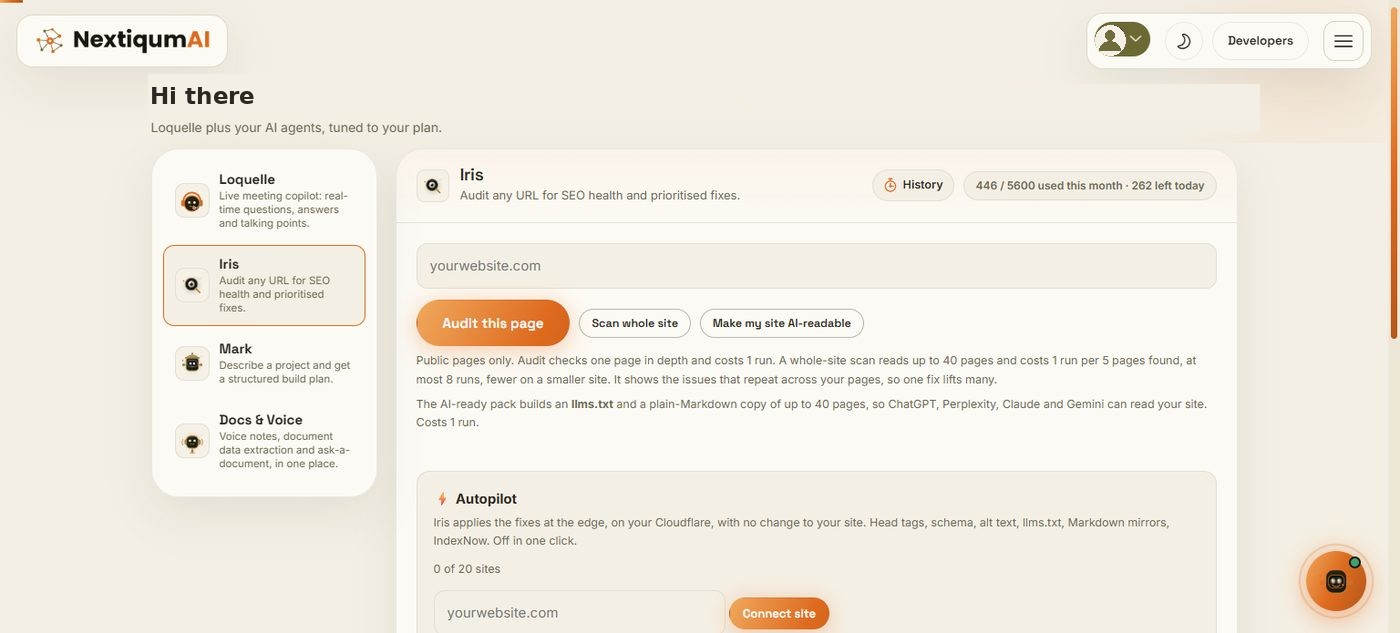
Go to nextiqumai.com/iris, paste any public URL and press Audit this page. No sign-up. Iris fetches the page the way a search crawler first sees it (the raw HTML, before JavaScript runs), reads its signals, and in about a minute returns two scores, the reasons behind them, and the fixes.
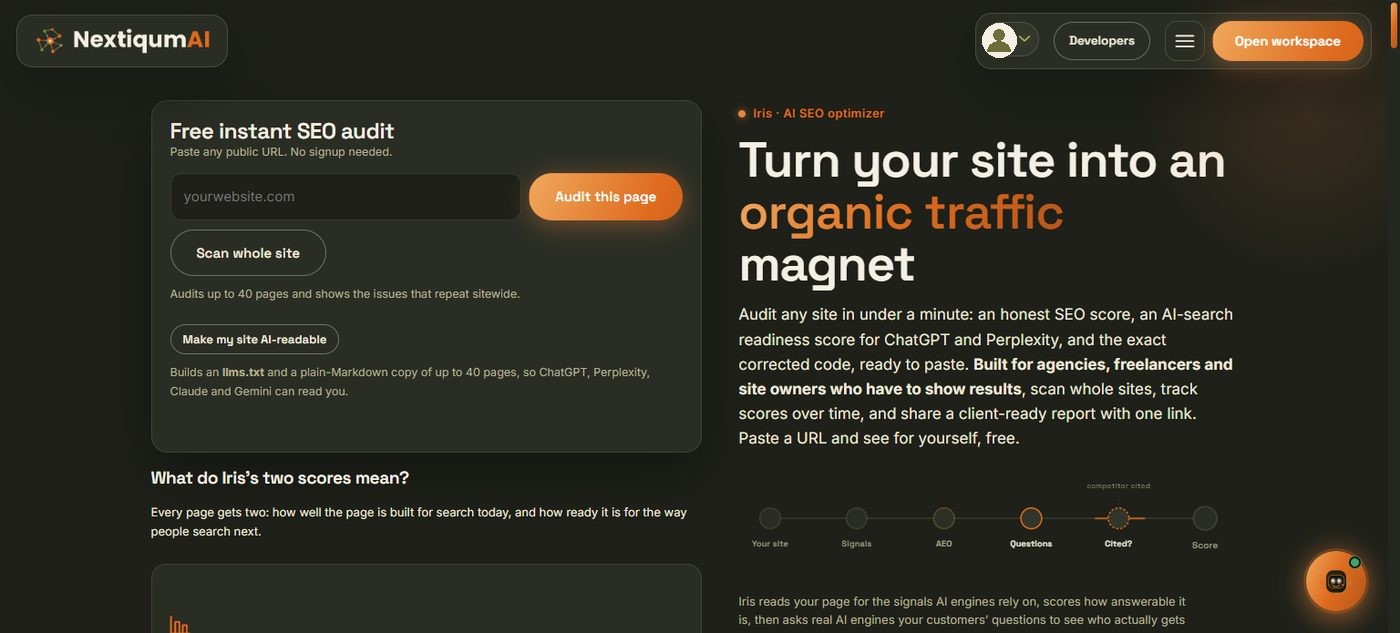
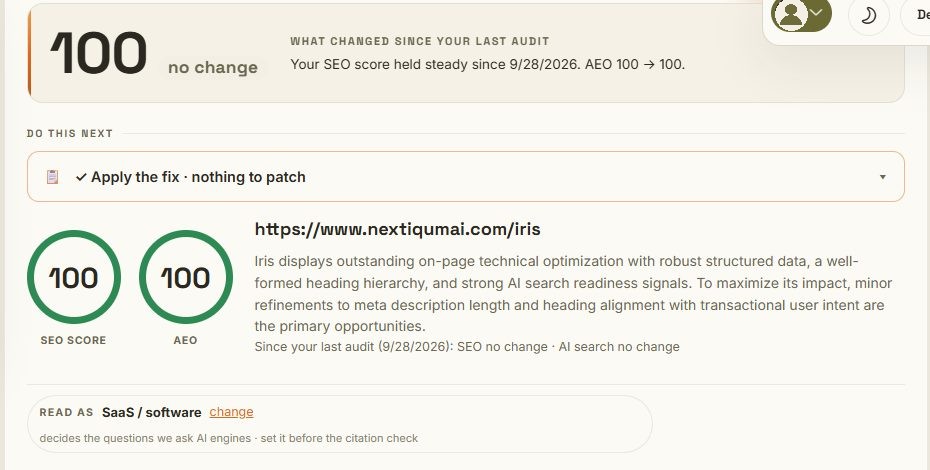
Signed-in members run the same audit from the workspace and get history, score-over-time and the extra tools shown below. Every audit ends with Apply the fix: one corrected <head> block containing only the tags that are missing or wrong, ready to paste, plus a prioritised list of quick wins with the code for each.
Step 2
What the scores mean
SEO score is how well the page is built for search today: indexable, canonical, title and description at the right length, one H1, alt text, robots and sitemap present, and so on. It is deterministic, so a change in the score is a real change on the page.
AEO (AI-search readiness) is how easy the page is for an answer engine to parse, quote and attribute: structured data, question-style headings, an author and date where the page type needs them, lists, and an llms.txt on the site. It is a prediction about your page.
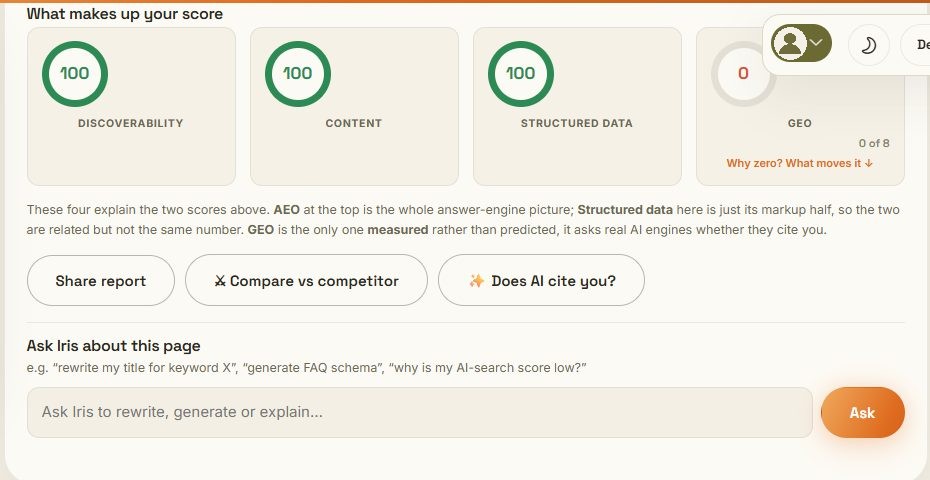
Underneath, four facets explain the two numbers. Discoverability, Content and Structured data are read from the page. GEO is different: it is the only one that is measured rather than predicted, because it asks real AI engines whether they name you (Step 4).
Step 3
Scan the whole site
On paid plans, Scan whole site reads your sitemap and the links on your homepage, fetches the pages in parallel, scores each one, and reports the issues that repeat across the site so one fix lifts many pages. It also runs the Agent-Ready check: which AI crawlers your robots.txt allows (GPTBot, ClaudeBot, PerplexityBot, Google-Extended, CCBot), whether your sitemap is fresh, and whether you have an llms.txt. If you do not, Iris writes one from the pages it just read.
Pages that have not changed since the last scan are served from a one-week cache and do not spend a run, so re-scanning after every small edit is cheap. A scan costs one run per five pages found, at most eight.
Step 4
Does AI name you? The citation check
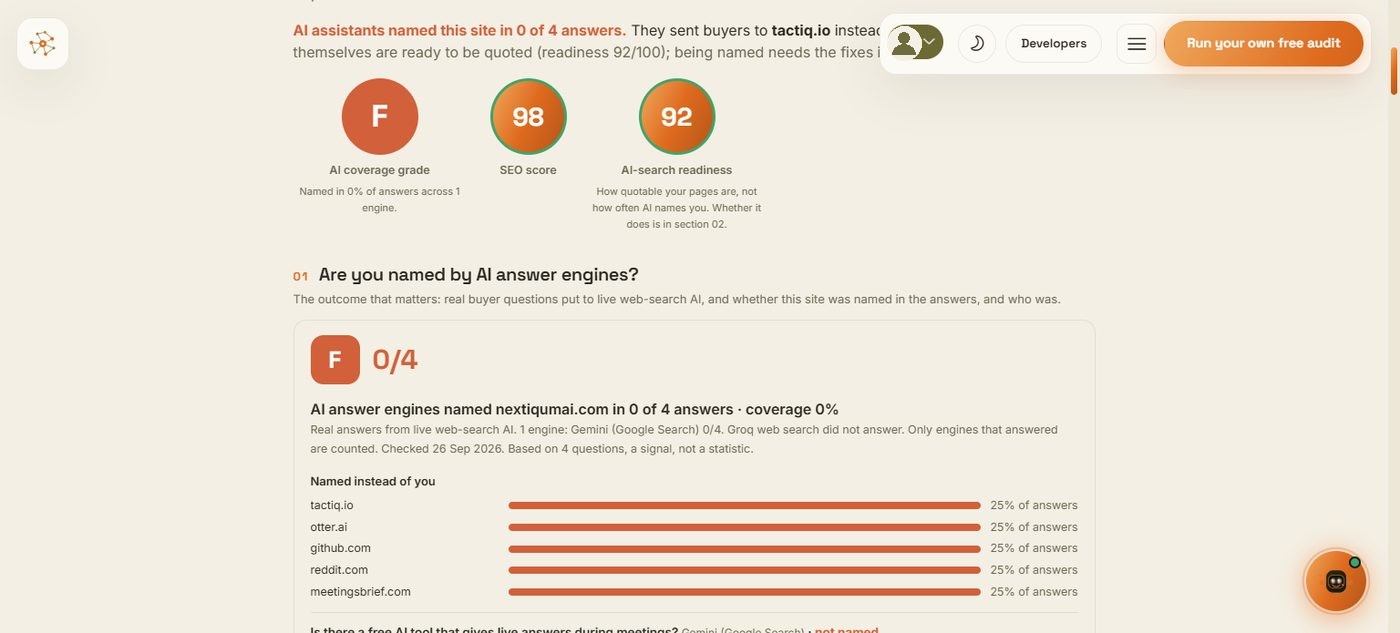
This is the number a client actually cares about. Iris works out what your page is about, writes the questions a buyer in that category would ask, and puts them to live web-search AI engines (Groq web search, Gemini grounded with Google Search, and ChatGPT search where enabled). Every engine answers every question. The result is a coverage grade from A to F, a tally per engine, and who was named instead of you with each competitor's share of the answers.
Two honesty rules are built in. An engine that fails to answer is left out rather than scored as a miss, and a placeholder domain a model writes while explaining a method (yourdomain.com and friends) is never counted as a competitor. With four questions the panel says so: treat it as a signal, not a statistic. Admins can raise the question count.
Step 5
Share a client-ready report
Any audit or whole-site scan can become a public, read-only link (nextiqumai.com/r/…) that opens without an account and has a Download as PDF button. The report leads with the outcome: the coverage grade and the "named in X of Y answers" verdict, then who was named instead, then readiness and the fixes. On paid accounts the citation evidence is refreshed when the link is opened if it is more than a week old. Links expire after 30 days; you can always make a new one.
Step 6
The AI-ready pack: llms.txt and Markdown
A web page is mostly markup. Make my site AI-readable builds an llms.txt index and a plain-Markdown twin of each page, zipped with a README that says exactly where to upload them. Answer engines read Markdown far more reliably than a themed page. Installers, PDFs and images are never mistaken for pages. If you use Autopilot (Step 8) you do not need to upload anything: it serves both from the edge and keeps them current.
Step 7
Monitoring and alerts
Press Monitor this page on any result. Iris re-audits the page daily (or weekly, or paused) and emails you when the SEO or AI-search score drops by more than your threshold. Monitored sites also get a weekly citation check with an email the week AI assistants start or stop naming you, or your grade changes. Explorer monitors 5 pages, Enterprise Domain 20.
Step 8
Autopilot: the fixes applied for you
Every other tool stops at the report. Autopilot closes the gap: Iris applies the fixes to each page as it leaves your site, so nobody has to edit a theme or paste code. It runs from a small Worker installed in your own Cloudflare account, or from the WordPress plugin if you are not on Cloudflare. Your files are never modified.
In plain words
Think of Autopilot as a proof-reader standing at your front door. Your pages stay exactly as they are on your server. When a visitor or an AI crawler asks for a page, the page passes the proof-reader on its way out, and the proof-reader fixes the missing title, description, schema and alt text in the copy that is handed over. The original is never touched. Switch Autopilot off and the proof-reader steps aside; the page is served as it always was.
What Autopilot never does
- It never edits, uploads or deletes a file on your server. There is no FTP, no theme change, no database access.
- It never invents text. Titles and descriptions are rewritten from your page's own heading and copy; FAQ answers are sentences copied word for word from the page; schema is built from what the page already declares.
- It never changes visible content silently. Question headings and FAQ blocks are emailed to you first and wait 48 hours; one click declines a page.
- It never touches legal pages, policy pages or a person's profile page, and it leaves step labels and numbered clauses as they are.
- It never locks you in. Pause, remove a page, or remove the site, and every page is served exactly as it was. If Iris is unreachable, the Worker serves your page untouched.
How installing works
Connect your domain in the Iris workspace, pick where the site is hosted, and follow the one path that applies. Each path takes about five minutes and the panel turns green the moment your site first calls Iris. Nothing on your server is edited on any of them.
Cloudflare (any host, any CMS; the free Cloudflare plan is enough)
Easiest, one paste. Open dash.cloudflare.com/profile/api-tokens (profile icon top right → My Profile → API Tokens) → Create Token → at the bottom of the template list, Create Custom Token → Get started. It is an API token, not the Global API Key. Permissions: Zone · Zone · Read, Account · Workers Scripts · Edit, Zone · Workers Routes · Edit. Zone Resources: Specific zone · your domain. Continue → Create → copy the token → paste it in the Iris panel → Install on Cloudflare. Iris uploads the Worker and the route; the token is used once and not kept.
Or paste the code yourself, four screens. Press Copy worker code in the panel, then in Cloudflare: (1) Workers & Pages → Create → Start with Hello World, name it iris-autopilot, Deploy. (2) Edit code: select all, delete, paste, Deploy. (3) Tab Domains (older dashboards: Settings → Domains & Routes) → Add Route: zone your domain, route *yourdomain.com/* with both asterisks, failure mode Fail open. (4) Open any page of your site; the panel turns green. The most common mistake is the route yourdomain.com/ without asterisks, which matches only the bare homepage URL.
WordPress (not on Cloudflare)
Press Download the plugin in the panel; your site key is already inside the zip. WordPress admin → Plugins → Add New → Upload Plugin → choose the zip → Install Now → Activate. Open any page; the panel turns green. Nothing to configure. If your WordPress is also behind Cloudflare, use one path, not both.
Shopify (nothing to install, about five minutes)
A Shopify store cannot sit behind a Worker, so Iris writes its fixes into Shopify's own SEO fields instead. All you do is create a small private key in your store, once, and paste it into the panel. The panel walks you through it one click at a time: (1) type your .myshopify.com address, found under Settings → Domains; (2) press the link that opens Settings → Apps and sales channels → Develop apps in your store (press Allow if Shopify asks about custom app development); (3) Create an app named Iris Autopilot; (4) Configure Admin API scopes and tick five boxes: write_metafields, read_products, read_content, read_online_store_pages, read_themes; (5) Install app, then Reveal token once and copy the key starting with shpat_; (6) paste it into the panel and press Connect Shopify. The line turns green at once, and Seed from sitemap prepares every page of the store.
The key lets Iris read your pages and write its own SEO fields. It cannot change products or prices and cannot see customers, orders or payments; uninstall the app in Shopify at any time to revoke it. The FAQ block and structured data on the page are an optional seventh step, one line in your theme that the panel gives you ready to paste and that you can delete again. Not comfortable doing it yourself? Press Copy these steps or Email the steps in the panel and send them to whoever runs your store.
Somewhere else
Put your DNS on Cloudflare (free): add the site at cloudflare.com, change the two nameservers at your registrar, wait for Active, then follow the Cloudflare path. Iris Enterprise Domain includes a set-up done for you.
What happens after the install
- Pages go live. Every page a visitor opens is prepared on first sight, or press Seed from sitemap to prepare the whole site in advance. Markup fixes apply immediately: title and description length, canonical, Open Graph, Twitter card, Organization, WebPage and BreadcrumbList schema, the language attribute, alt text for images that have none, plus llms.txt, /md/ mirrors and the IndexNow key file.
- Content changes wait for you. A heading reworded into a question, or a FAQ block, is a change a reader sees, so it is never silent. You get one email per site listing every proposed change with the before and after text and a decline link per page. If nobody objects within the window (48 hours by default, 0 to 168) it applies. In the panel you can apply now, decline, undo or allow any page at any time. Legal pages, policy pages, profile pages, step labels, numbered clauses, linked headings (another page's title on a blog or category index) and noindex pages are never reshaped. Our advice: let the markup changes run, read each content proposal once (open "See the exact changes"), press Apply now when a question reads the way a buyer would ask it, and Decline when it does not sound like you. The window is there so you look first; it is not a queue to clear.
- Proof. A day after a page goes live, Iris scores it again through your live site and shows before and after, per page, then re-checks monthly. Every changed URL is pushed to Bing and the other IndexNow engines.
- Budget. Iris Explorer covers 2 sites and 300 pages under Autopilot; Iris Enterprise Domain 20 sites and 1,500 pages. Pages are only rebuilt when their HTML changes, so the budget is about pages, not visits.
- Off switch. Every page has an on/off toggle, the site has Pause, and Remove takes Iris out entirely. Because nothing was written to your server, off means your site is exactly as it was.
Step 9
Developer API
Iris Enterprise Domain includes the developer API. Create a key under Settings → Developer API; it is shown once and stored only as a hash. Call the audit and the other agents from your own server with a Bearer header, as part of your plan and with no separate bill. Every response carries an X-NX-Request-Id you can quote to support, and an invalid key answers 401 invalid_key rather than falling back to anonymous access. The full reference is at /developers.
curl https://www.nextiqumai.com/api/audit.php \
  -H "Authorization: Bearer nx_live_..." \
  -H "Content-Type: application/json" \
  -d '{"url":"https://example.com"}'
Step 10
What each plan includes
| Feature | Free | Iris Seedling | Iris Explorer | Iris Enterprise Domain |
|---|---|---|---|---|
| Single-page audit with fixes | A few a day, no sign-up | Yes | Yes | Yes |
| Saved history and score over time | - | Yes | Yes | Yes |
| Whole-site scan | - | Up to 8 pages | Up to 15 pages | Up to 40 pages |
| AI citation check | - | Yes | Yes | Yes |
| Share link with PDF | Yes, signed in | Yes | Yes | Yes |
| AI-ready pack (llms.txt + Markdown) | - | 8 pages, 4 packs a month | 15 pages, 20 a month | 40 pages, 60 a month |
| Monitoring with alerts and weekly citation checks | - | - | 5 pages | 20 pages |
| Autopilot | - | - | 2 sites, 300 pages | 20 sites, 1,500 pages |
| Developer API | - | - | - | Yes |
| Price | $0 | $9/month | $29/month | $79/month |
Annual billing is two months cheaper on every tier. Live figures are on the pricing page, which is the authority if anything here changes.
Status
Where every NextiqumAI product and service stands today
Updated 28 September 2026.
Iris Live
Everything on this page is live: free audit, whole-site scan with Agent-Ready check, multi-engine citation check with coverage grade and competitor share, share links with PDF, AI-ready pack, daily monitoring with weekly citation alerts, Autopilot (Cloudflare Worker and WordPress plugin), and the developer API on Enterprise Domain.
Loquelle Live
The live meeting copilot is available three ways on one account: the web app in the members workspace, the Chrome extension on the Web Store (version 0.3.13 published; 0.3.14 submitted and in review), and the Windows desktop app (0.3.13, invisible on screen share). Modes: Meeting, Technical, Presentation, Screen, Listening and Learn, plus Follow-ups across meetings and the weekly digest. A macOS build is planned; it needs a native system-audio capture path first.
Shared agents Live
Mark (project build plans), tiQ (site concierge), Echo (voice to notes), Dex (document extraction) and Sage (ask a document) come with either subscription and are open to try on the AI Playground.
Services Open
Custom software and AI builds under the client's brand: generative AI and RAG assistants, computer vision and OCR, web and e-commerce (Shopify, ASP.NET), mobile (Flutter, Kotlin, Swift, React Native), cloud and DevOps, AI security and penetration testing, data engineering, and growth marketing for e-commerce (Meta, Google and TikTok ads, email flows, SEO, AEO and GEO). Quoted per project after a short scoping call; ad budgets always run on the client's own accounts. NextiqumAI is a Pakistani software company with its team in Lahore and the founder in the EU time zone, serving clients remotely across Europe, the UK, the United States and the Gulf.
Try it on your own page
One URL, one minute, no sign-up. Then decide whether you want Iris to keep it fixed for you.
Audit a page free Compare with other tools