


Loquelle has six modes. Three of them are free on every plan and use nothing but your normal minutes: Meeting mode (the default: questions spotted, answers you can say, strategic notes), Listening mode (notes on a webinar or broadcast you only watch) and Learn mode (study notes, flashcards and a quiz from a lecture or course, lessons threaded by course). The other three do more than answer a question in a meeting: Presentation mode follows your slides while you present, Screen mode answers whatever is on your screen with one hotkey, and Technical mode writes full code and designs live on a technical call. Each of those costs more to run than a plain live answer, so each plan includes a set amount of them every month. This page says exactly what that is, in plain numbers, so you can pick a plan without guessing.
The numbers here are the allowances on the day this was published (September 2026). The pricing page always shows the live figures, and your account page shows how much of each you have used this month.
What each mode actually does
Presentation mode
Attach your deck as a .pptx or PDF, set your time slot and press Start. While you talk, Loquelle works out which slide you are on from what you say, shows its title and a clock against your slot, and hands you a short spoken script for the slide you have reached, starting with the opening lines for slide one the moment you press Start. When someone in the room asks a question, you get a ready-to-say answer grounded in the deck, with the slide it came from. Quiet cues fire once each: halfway, ninety percent, time up, running behind pace, a skipped slide, the last slide. Afterwards you get a recap of every audience question, the objections, everything you promised to send, and a follow-up email to the attendees.
One presentation session is one talk: you press Start in Presenting mode once, and it counts once however long the talk runs. The minutes themselves come out of your normal Loquelle minutes.
Screen mode
Press Ctrl+Shift+A in the Windows app, or click Answer this tab in the Chrome extension, and Loquelle reads what is visible and answers it: a written question gets a direct answer, a page of multiple-choice questions gets every item answered in order, a coding task gets complete runnable code, an error message gets the likely fix. It works mid-meeting too and cross-matches the answer with what the call is discussing. The capture is processed in memory and never stored; only the answer text is saved to your history.
One screen answer is one capture, whatever is on it. A failed capture is refunded and does not count.
Listening mode and Learn mode (free)
Tick "I'm only listening" for a webinar or broadcast and Loquelle switches from words to say to notes: the claims, figures and offers just stated, quoted faithfully, plus questions to ask later, and a takeaways recap at Stop. Tick "I'm in a lesson" for a lecture or course video and it takes study notes instead (a definition when a term is defined, why a point matters, an example, what will be tested), then writes structured notes with flashcards and a short quiz from what the teacher said; name the course and your lessons are threaded together. Neither has a monthly cap; they use your normal Loquelle minutes. Follow-ups, the list of action items across every meeting, and the Briefing across a thread are also on every plan (a Briefing costs one run from your daily pool).
Technical mode
On a technical call or interview, Loquelle writes the full algorithm, code, architecture or diagram you were asked for, commented section by section so you can explain it aloud, and updates it live when the other side changes the task. It works for any field, not only software: system design, data, finance, engineering.
One technical answer is one reply that actually said something. The quiet polls between answers, where Loquelle has nothing to add, are free.
What each plan includes, per month
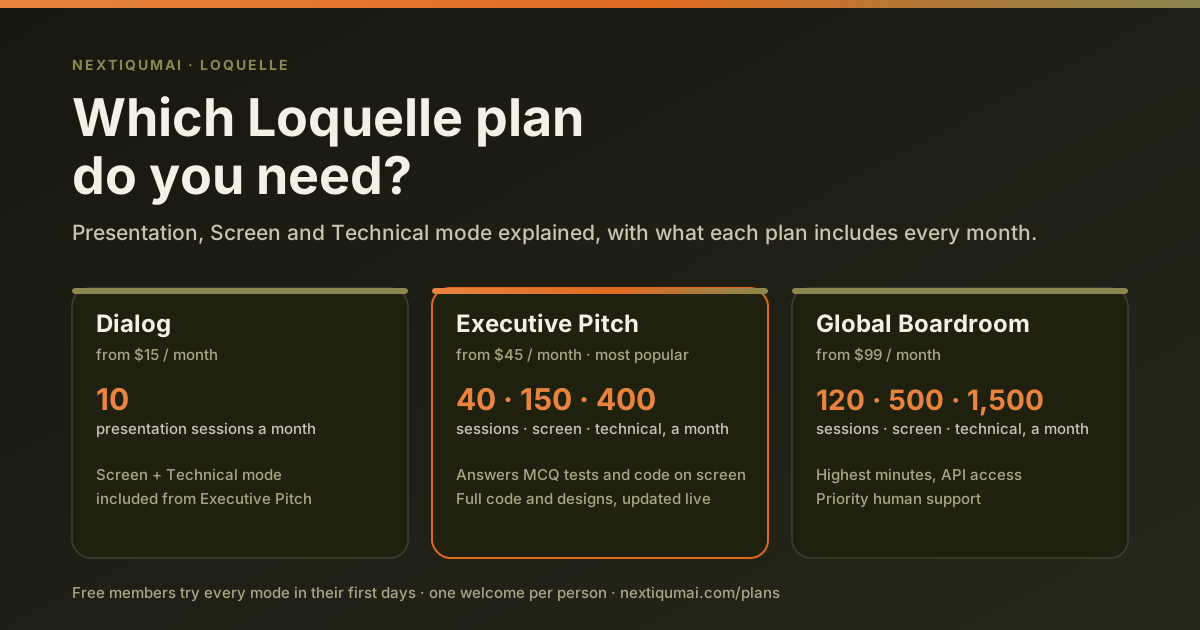
| Plan | Presentation sessions | Screen answers | Technical answers |
|---|---|---|---|
| Free | Welcome days only | Welcome days only | Welcome days only |
| Loquelle Dialog | 10 | Not included | Not included |
| Loquelle Executive Pitch | 40 | 150 | 400 |
| Loquelle Global Boardroom | 120 | 500 | 1,500 |
Everything resets at the start of each month. Over a cap nothing breaks: a presentation continues as a normal live meeting, a technical call continues in normal mode, and the panel tells you once which limit you reached. A higher plan adds more; you can move up any time from your account and the unused part of the old plan is credited.
What new members get
A new account gets its first three days at full strength: a raised daily minute allowance, and Presentation, Screen and Technical mode open to try, with two presentation sessions, ten screen answers and thirty technical answers. That is enough to see each mode work on a real call, which is the only honest way to decide whether it is worth paying for.
It is one welcome per person. Deleting an account and creating it again does not grant another; we keep a one-way hash of the email, nothing more, for exactly that reason. Our privacy policy says so under account deletion.
Why the limits exist at all
We measure what every feature costs to run and price the plans so that each stays profitable even if a member uses every unit of it. A live answer in a meeting is cheap. A screen answer is a vision call on an image. A technical answer runs the larger model at up to 1,400 tokens of output. Every poll during a presentation carries the whole deck, up to twelve thousand tokens, so that the answer can cite a slide. Minutes alone do not bound those three, and a plan that could lose money on one heavy user would eventually be a plan we had to withdraw. Publishing the numbers is fairer than a vague "fair use" clause that gets applied after the fact.
Which plan should you pick?
If you present decks and want the slide following, the openers and the recap, Dialog covers ten talks a month. If you sit interviews or technical calls, Executive Pitch is the one: Screen mode for the written test and Technical mode for the live coding, with 150 and 400 a month, which is a lot of interviews. Global Boardroom is for people who live in meetings and presentations, with the highest minutes, API access and a human on support. Not sure? Start free: the welcome days show you every mode, and the free plan keeps live answers and the recap for your regular calls.
Questions people ask
Do presentation minutes count separately from meeting minutes?
No. A presentation uses your normal Loquelle minutes. The session count is a second, separate limit on how many talks a month can use Presentation mode.
Does a silent poll in Technical mode count?
No. Only a reply that returned code, a design or an answer counts. Waiting while the interviewer explains the task is free.
Does a failed screen capture count?
No. If the capture cannot be read or the model fails, the run and the screen answer are both refunded.
Can I buy more without changing plan?
Top-up credits open Technical and Screen mode while you hold a balance, and each answer then costs credits instead of counting against a plan cap. For regular use a higher plan is cheaper per answer.
Can I try the modes before paying?
Yes. Every new account gets the welcome days with all three modes open, once.